Red Baron
Game Objective
Red Baron is an exciting, fast-paced crash game with quick and easy rounds. Place your bet, enjoy the take-off and watch your bet multiply up to 20,000x! Feel the rush as you see the plane flying, but be careful — if you wait too long to cash out, the plane will fly away!
Game Rules
The aim of the game is to cash out before the plane flies away. The game features two phases — the Betting phase and the Flying phase.
Betting Phase
Place up to 3 independent bets in each round. To add or remove bet spots, click/tap on the “+” or “-” buttons.
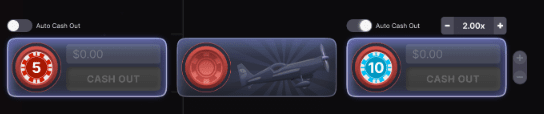
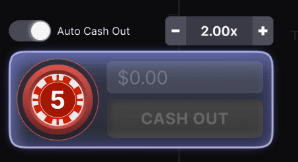
By enabling “Auto Cash Out” with a toggle switch button, you can set a separate multiplier for each bet, determining when your bet will be automatically cashed out. Adjust the multiplier by clicking/tapping the “+” and “-” buttons.
Flying Phase
Once the betting time is over, the plane takes off, and the multiplier starts to increase.
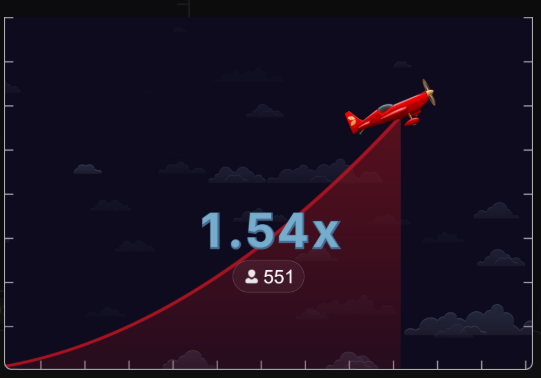
The longer you wait, the bigger your multiplier — just make sure to cash out before the plane flies away! If you wait too long and the plane flies away before you cash out, you lose your bet.
A Random Number Generator (RNG) is used to determine when the plane flies away. Please note that occasionally the plane flies away immediately (at 1.00x). In this case, all placed bets will be lost.
Cash Out
Click/tap on the “Cash Out” button to secure your winnings. You can cash out at any time, up until the moment the plane flies away.
The game round ends for you when you click/tap on the “Cash Out” button and collect your winnings, when the “Auto Cash Out” is triggered, or when the plane flies away.

If you have placed bets on more than one bet spot, each bet should be cashed out independently.
If you switch to a device or resolution that can’t display all your bet spots, the unsupported bet spots will be removed. Bets on those bet spots will be cashed out immediately.
Payouts
The payout equals the initial bet multiplied by the multiplier at the time of cashing out.
BET |
PAYS |
| Bet 1 | 1.01-20,000 x bet |
| Bet 2 | 1.01-20,000 x bet |
| Bet 3 | 1.01-20,000 x bet |
The maximum payout is 20,000x or $500,000, whichever is lower.
Please note that any malfunction voids the game round and all eventual payouts for the round. Bets will be returned.
Your winnings will always be rounded up or down to the nearest smallest unit of currency (e.g., eurocents for EUR, cents for USD, pennies for GBP, and no decimals for JPY) by generating a random number and comparing it with the portion of the winnings to be rounded off in order to determine the rounding direction. For more information, see the Rounding chapter.
Return to Player
The optimal theoretical return to player (RTP) percentage is 97.00% for any bet.
Place Bets
The BET LIMITS panel shows the minimum and maximum allowed bet limits at the table, which may change from time to time. Open the Bet Limits to check your current limits.
Red Baron DNT
$0.10 – 10,000
To participate in the game, you must have sufficient funds to cover your bets. You can see your current BALANCE on your screen.

The TIMER informs you of the duration of betting time. After it expires, the betting is closed, and no more bets are accepted.
The CHIP DISPLAY allows you to select the value of each chip you wish to bet. Only chips of denominations that can be covered by your current balance will be enabled.
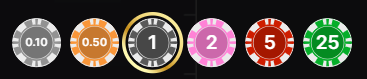
Once you have selected a chip, place your bet by simply clicking/tapping the appropriate bet spot on the game table. Each time you click/tap the bet spot, the amount of your bet increases by the value of the selected chip or up to the maximum limit for the type of bet you have selected. Once you have bet the maximum limit, no additional funds will be accepted for that bet, and a message will appear above your bet to notify you that you have bet the maximum.
NOTE: Please do not minimize your browser or open any other tab in your browser while betting time remains, and you have placed bets on the table. Such actions may be interpreted as leaving the game, and your bets will therefore be declined for that particular game round.
The REPEAT button allows you to repeat all bets and Auto Cash Out multipliers that you have placed in the previous game round. This button is available only before the first chip is placed. REPEAT is available only if the previous round’s bet spots are active in the current round.

The DOUBLE (x2) button becomes available after you have placed any bet. Each click/tap doubles all your bets up to the maximum limit. Note that you must have a sufficient account balance to double ALL your placed bets.

The UNDO button removes the last bet you placed.

You can click/tap the UNDO button repeatedly to remove bets, one by one, in the reverse order in which they were placed. You can clear all your bets by holding the UNDO button.
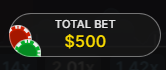
The TOTAL BET indicator displays the total amount of all bets placed in the current round.
Result Statistics
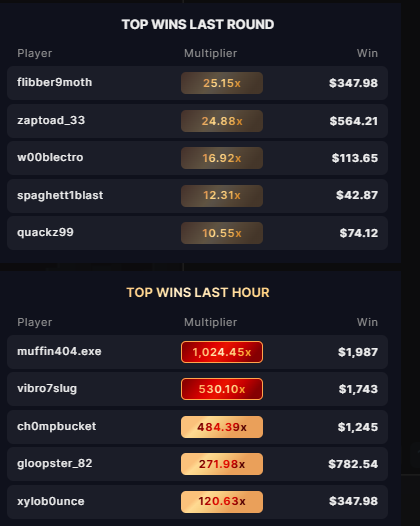
During the Betting phase, Top Wins in the last hour and Top Wins in the last round are shown on the screen, along with players’ names, multipliers at which they cashed out and the win amount. On mobile devices, only the Top Wins in the last round are shown.
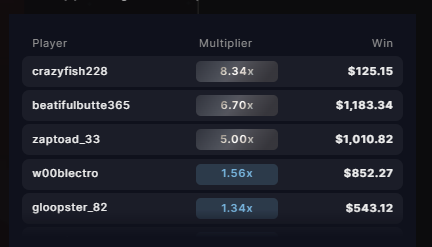
During the Flying phase, you can view a live list of players cashing out (available only on desktop view). The list is chronological, with the newest results appearing at the top of the list and the older results sliding down.
During all game phases, there is a horizontal lane of the final multipliers of previous game rounds. The most recent multipliers appear on the left side.

Rounding
Your winnings will always be rounded up or down to the nearest smallest unit of currency (e.g., eurocents for EUR, cents for USD, pennies for GBP, and no decimals for JPY) using an RNG-based approach. This method introduces an element of randomness to the rounding process. Here’s how it works:
First, the unsupported decimal part is converted (underlined here for clarity) into six-digit numbers (i.e., hundreds of thousands). For example, 1.263 becomes 300,000, 5.23568696 becomes 568,696, 4.25034 becomes 34,000.
In the second step, a random number between 1 and 1,000,000 is generated.
Finally, if the converted six-digit number is higher than the RNG result or equal to it, the unit of currency is rounded up. If it’s lower, the unit of currency is rounded down.
Example: Let’s assume that the number 500,000 is randomly generated in the second step. In this case, our example numbers would be rounded up or down as follows: 1.263 would be rounded down, because 300,000 is lower than 500,000, 5.23568696 would be rounded up because 568,696 is higher than 500,000 and 4.25034 would be rounded down because 34,000 is lower than 500,000.
Connection & Performance
If your internet connection is slow or unstable, the game may not respond to your actions immediately. This can lead to delays when placing bets or cashing out.
Latency: 57 ms
You can monitor your connection quality in real time using the latency counter shown in the game interface. It displays the signal travel time in milliseconds, with color indicators representing connection quality:
 Green (0-150 ms): Good connection
 Yellow (151-300 ms): Average connection
 Red (301+ ms): Poor connection
Please note that playing with a weak or unstable connection is at your own risk and may affect your overall gaming experience.
Live Support
Contact Live Support for game-related inquiries.

Chat
Chat with other players and/or with a game presenter.

Game Number
Each game round is identified by a unique GAME NUMBER.
21:10:10
This number reflects when the game round began in terms of GMT by hour: minute: second. Please use this game number for the reference (or take a screenshot of the game number) if you wish to contact Customer Service regarding a particular round.
Sound
Sound controls all sounds in the game.

Game History
Game History displays your Evolution game rounds and results.

Settings
Settings let you customize user preferences that are saved to your profile.

Autoplay
To start Autoplay, place your bet, enable “Auto Cash Out,” and then click/tap the Autoplay button to repeat that bet.

If you change the “Auto Cash Out” value while Autoplay is enabled, a message will pop up asking you to continue. Without the confirmation, Autoplay will be disabled.
Autoplay will be disabled if none of your bets have the “Auto Cash Out” option enabled.
Responsible Gaming
The RESPONSIBLE GAMING button allows you to access the page outlining the Responsible Gaming policy. This page provides useful information and links regarding responsible online gaming behavior and how to set limitations to your game sessions.

Error Handling
If there is an error in the game, system, or game procedure, the game round will be temporarily paused. You and other players will be notified via Chat, or by an on-screen pop-up message, that the issue is being investigated. If the manager can immediately resolve the error, the game round will continue as normal. If immediate resolution is not possible, the game round will be cancelled, and the initial bets will be refunded to all the players who participated in the game round.
Disconnection Policy
If you are disconnected from a game round, any placed bets remain valid and are settled in your absence. Upon reconnecting, you can view the bet outcomes in the History window.
More Games
Evolution Lobby — easy game selection without exiting your current game until a new game is chosen.

Multi-Game Play
If you enjoy non-stop action, you can join more than one game table — then view and play them simultaneously, all in the same browser window!
After you have joined at least one game table, click on LOBBY. In the lobby or game, click the +TABLE button associated with that table to join it. Certain tables may be unavailable for multi-game play and will therefore not display a +TABLE button.

After you have joined multiple tables, you will be able to resize your browser window as a whole, but you will not be able to resize each game table window separately.
You can exit any table without affecting your presence at other tables you have joined. To exit a table, click the X button.
Please note:
You will automatically exit a table if you join the same table through a different device/browser.
If you click directly on a table icon instead of the +TABLE button, you will merely switch tables instead of joining the chosen table in addition to the table you joined previously.
We kindly advise you to join only as many tables as your screen can accommodate while still allowing you to place bets deliberately and accurately.
Shortcut Keys
Shortcut keys can be used to quickly perform useful game functions.
KEY |
FUNCTION |
| Number Keys from 1 onwards | Select the desired chip from the chip display. Key “1” corresponds to the leftmost chip with the lowest value. Key “2” selects the next highest value chip, and so on. |
| SPACEBAR | Repeat your most recent bet. Press SPACEBAR a second time to double your bet. |
| CTRL+Z (CMD+Z), DELETE, BACKSPACE | Undo your last bet. Hold for 3 seconds to remove all your bets. |
|
ESC |
When applicable, the ESC key can be used to: Exit the full-screen mode Close an open pop-up window (History, How To Play, Settings, etc.) |
Last modification date: 12/17/2025