Flock Me
Game Basics
Flock Me is a 6-reel, 7-row video slot with the Cluster Pays™ mechanics, the Avalanche™ feature, the Cleaning feature, the Flock Me feature, and different types of Wild symbols. The game also has Free Spins and the Elevate feature with five options.
The game is played with clusters of symbols, with wins awarded for clusters of 5 or more of the same symbols. A symbol is part of a cluster if it is horizontally or vertically adjacent to the same symbol. Multiple clusters of the same symbol that are not adjacent to each other pay as separate clusters. Only the highest win per cluster is paid, and simultaneous wins from multiple clusters are added.
A cluster win is equal to the value shown in the Paytable multiplied by any applicable multipliers. Symbol payout values shown in the Paytable are dynamic and change in accordance with the selected bet value.
Any win starts an Avalanche™. Symbols in winning combinations disappear, leaving space for a new Avalanche of symbols. After all positions are filled, the wins are evaluated again. Avalanches continue until there are no more wins.
Colossal Symbols
Low-win and high-win symbols can randomly appear on the reels as 1x1 symbols or colossal 2x2 symbols in the main game and Free Spins. During the Avalanche, the symbols fill the empty positions below colossal symbols. Any colossal symbol counts as 4 symbols for a cluster.
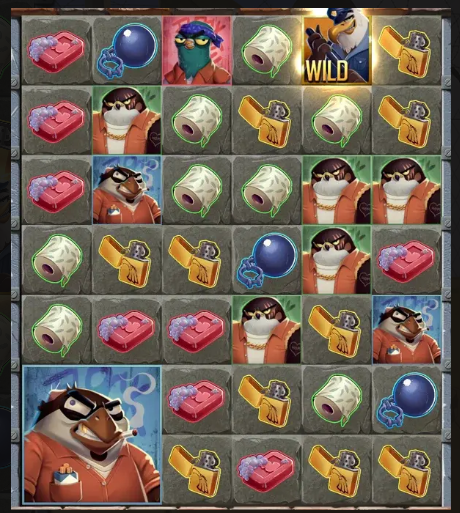
Wild Symbols

All types of Wild symbols substitute for all symbols except for Scatter, any type of Wild, Flock Me and Cleaning symbols. Wild symbol substitution pays the highest possible winning combination in a cluster according to the Paytable.
Multiplier Wild Symbols
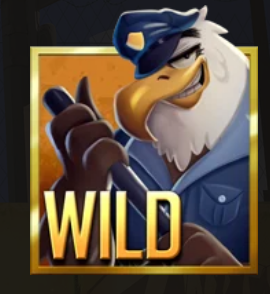
The Multiplier Wild symbol randomly appears in the main game and Free Spins. Every time a Multiplier Wild symbol is part of a cluster win, it randomly moves vertically, horizontally, or diagonally to an adjacent position, its multiplier increases by 1, and the Avalanche starts. Multiplier Wilds stay in their positions during an Avalanche. The multiplier value does not have a limit. If a Multiplier Wild symbol moves onto a position of a 2x2 colossal symbol, the Multiplier Wild transforms into a 2x2 colossal Multiplier Wild symbol. If a 2x2 colossal Multiplier Wild symbol moves onto a position of a 1x1 symbol, it transforms into a 1x1 symbol.
The Multiplier Wild symbol can move onto any symbol except Scatter, Cross Wild, Multiplier Wild, Flock Me, and Cleaning symbols. If all adjacent positions are covered with any of these symbols, the Multiplier Wild symbol moves to a random position on the reels not covered with a Scatter, Cross Wild, Multiplier Wild, Flock Me, or Cleaning symbol. When the Multiplier Wild symbol moves, a Wild symbol is placed in the position the Multiplier Wild has left.
The Multiplier Wild symbol remains on the reels until the end of the round. In a cluster win with more than one Multiplier Wild symbol, the values of the Multiplier Wild symbols are multiplied.
Flock Me Feature

When a Flock Me symbol appears on the reels, the Flock Me feature is activated after there are no more wins and no Cleaning symbol on the reels after the Avalanche ends.
All Multiplier Wilds on the reels move to positions adjacent to the Flock Me symbol (or, if all positions adjacent to the Flock Me symbol are already filled, the Multiplier Wilds move to the next adjacent position available), and a Wild is placed on each position left vacant. One additional Multiplier Wild is also placed adjacently to the Flock Me symbol and the Flock Me symbol becomes a Wild.
In case a Multiplier Wild on the reels is already adjacent to the Flock Me symbol when the Flock Me feature is activated, it remains where it is, and no Wild is placed in its position.
Cleaning Feature
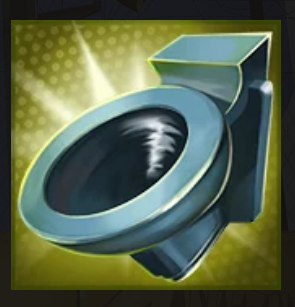
The Cleaning feature is activated after the Avalanche, when there are no more wins and the Cleaning symbol is present on the reels. The Cleaning symbol removes all symbols from the reels except Wild, Multiplier Wild, Cross Wild, Scatter, or Flock Me symbols.
Cross Wild Feature
The Cross Wild feature is activated before the Avalanche when at least one Cross Wild symbol is part of the cluster win. When activated, it transforms both 1x1 and 2x2 colossal high-win or low-win symbols covering the positions in vertical, horizontal, or diagonal lines into high-win or low-win symbols of the same type, and the Cross Wild symbol disappears.
If the Cross Wild feature is activated with more than one Cross Wild symbol, a Wild symbol is placed on every position where the transformation lines intersect. There are three types of Cross Wild symbols:
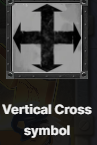
Transforms all the symbols on the reel and row where the Vertical Cross symbol is placed.
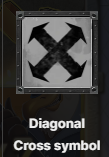
Transforms all the symbols placed on two diagonal lines intersecting where the Diagonal Cross symbol is placed.
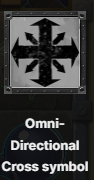
When the Vertical Cross symbol and the Diagonal Cross symbol are vertically adjacent to each other in a cluster win, the Vertical Cross symbol covers the Diagonal Cross, and together they turn into the Omni-Directional Cross symbol. The Omni-Directional Cross transforms all the symbols on the reel, row, and two diagonal lines intersecting where the Omni-Directional Cross is placed.
If the Cross Wild, Cleaning and Flock Me symbols appear on the reels simultaneously, they will be activated in the following order: Cross Wild feature, Cleaning feature, Flock Me feature.
Free Spins

3 Scatter symbols appearing anywhere on the reels in the main game award 5 Free Spins, if there are no more wins and no Cleaning symbol or Flock Me symbol on the reels after the Avalanche. The Multiplier Wild symbols from the main game and the ones that appear during the Free Spins remain on the reels until the end of Free Spins. 3 Scatter symbols appearing anywhere on the reels during Free Spins award 2 additional Free Spins.
Free Spins are played at the same bet as the round that activated Free Spins, and Free Spins end when the Free Spins counter reaches 0. At the end of Free Spins, the total win from Free Spins is added to any wins from the round that activated Free Spins, and the game returns to the round that activated Free Spins.
Elevate Feature
In-game features can be activated with the Elevate Feature. In the Elevate Feature, one of the following features can be activated per game round:
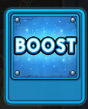
Boost Increases the chance of Multiplier Wild symbols appearing on the reels, or of activating a feature (Flock Me, Cleaning, Cross Wild or Free Spins) for 2 times the bet.
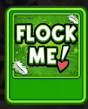
Flock Me Activates the Flock Me feature for 20 times the bet. One main game spin is guaranteed to have the Flock Me symbol to activate the Flock Me feature.

Super Flock Me Activates the Flock Me feature and places up to 2 Multiplier Wild symbols for 50 times the bet. The Flock Me symbol and up to 2 Multiplier Wild symbols are immediately placed on the reels.

Free Spins Activates 5 Free Spins for 100 times the bet. When the feature is activated, one main game spin is guaranteed to have 3 Scatters that activate Free Spins.

Super Free Spins Activates 5 Free Spins for 250 times the bet. Free Spins start immediately. At the beginning of the first Free Spin, the Flock Me feature is activated, and up to 2 Multiplier Wild symbols are randomly placed on the reels.
Pay Mechanic
The game is played with clusters of symbols.
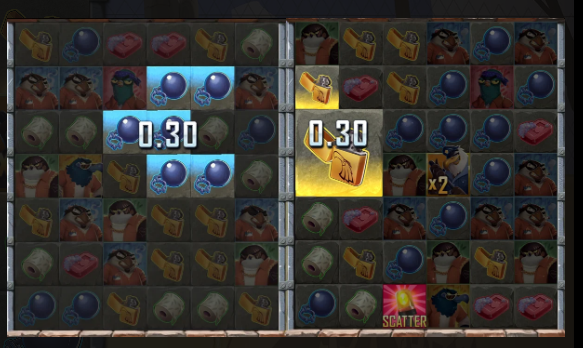
5 or more of the same symbols appearing in a cluster award a win. A symbol is part of a cluster if it is horizontally or vertically adjacent to the same symbol, without gaps.
Malfunction voids all pays and plays. For more information, see Unfinished Game Rounds.
Return to Player
The theoretical return to player for this game is 96.00%.
The theoretical return to player in the Elevate Feature with Boost is 96.05%.
The theoretical return to player in the Elevate Feature with Flock Me is 96.08%.
The theoretical return to player in the Elevate Feature with Super Flock Me is 96.09%.
The theoretical return to player in the Elevate Feature with Free Spins is 96.03%.
The theoretical return to player in the Elevate Feature with Super Free Spins is 96.06%.
Betting
To play the game, you must have sufficient funds to cover your bet. You can see your current BALANCE on your screen.
BALANCE
500.00
To start playing, first select the bet value. Click/tap "+" or "-" to increase or reduce the bet or click/tap on the bet value in the middle and select a bet value from a scrollable list. Please note that the selected bet will be applied to each spin. If your balance becomes insufficient to play, your bet will be automatically reduced to the highest available bet value.
Minimum bet: 0.2
Maximum bet: 120
Elevate Features have separate max bet values, listed below:
| Elevate Feature |
Maximum bet |
| Boost | 200 |
| Flock Me | 2,000 |
| Super Flock Me | 5,000 |
| Free Spins | 8,000 |
| Super Free Spins | 25,000 |
Once you have chosen the bet, click/tap the SPIN button to start playing.

During a spin, you can use the STOP button to stop the reels more quickly if possible.
To use the Elevate Feature, click/tap the ELEVATE button. In the Elevate Feature panel, select the feature of your choice. The total Elevate cost and the winnings are dynamic and change according to the spin bet value.
The Elevate Feature remains active for every spin until manually deactivated.
Autoplay
Autoplay allows you to repeat your selected bet for a chosen number of game rounds.
To start Autoplay, choose the desired bet value and then click/tap the Autoplay button.

In the Autoplay panel, you can start Autoplay by selecting the number of rounds you want your bet to be repeated for.

Your selected number of Autoplay rounds will be displayed on the Autoplay button. The number of remaining Autoplay rounds will be updated, once Autoplay is started.
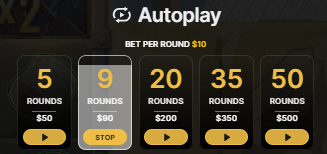
Your total Autoplay bet amount is calculated by multiplying the number of Autoplay rounds with the value of your bet. It is indicated under each Autoplay option. The remaining Autoplay bet amount will also be displayed under the chosen Autoplay option, once Autoplay has started.
Your automatic game rounds will continue until either your chosen number of Autoplay rounds are complete, you choose to stop Autoplay by clicking/tapping STOP, or the Free Spins round is activated.

When Autoplay is stopped, you will be able to start Autoplay with the previously selected bet and number of rounds again by clicking/tapping REPEAT.

While Autoplay is running, it is not possible to change your bets. You should stop Autoplay to change the bets.
Other Controls
 Click/tap the SOUND button to turn the game sounds on or off. Alternatively, use the slider to adjust the volume of game sounds. The button and/or the slider might not be available on some devices.
 Click/tap the SETTINGS button to open a menu of user-changeable settings:
All sounds: Turns the game sounds on or off. You can also use the slider to adjust the volume of game sounds, if it is available on your device.
Game effects and Music: Turn the game effects or music on or off. Alternatively, use the sliders to adjust the volume.
Game Speed: Select the desired spin speed — REGULAR, QUICK SPIN, or SUPER QUICK SPIN. Alternatively, click the QUICK SPIN button, if available on your device, to go from REGULAR to QUICK, from QUICK to SUPER QUICK, and from SUPER QUICK back to REGULAR speed.

Intro screen: Turns the intro screen on or off.
Confirm Elevate Features: Enables / disables the confirmation dialog when buying Elevate Features.
Spacebar to spin / stop a spin: Enables / disables the option to start or stop a spin using the spacebar.
 Click/tap the GAME HISTORY button to view the game rounds you have played and the results of those rounds.
 Click/tap the HOW TO PLAY button to view the game rules.

 Click/tap the FULL SCREEN button to enter the full screen mode or click/tap the EXIT FULL SCREEN button to exit it.
Unfinished Game Rounds
Any unfinished game rounds are resolved automatically after a period of inactivity.
In the event of malfunction of the gaming hardware/software, all affected game bets are rendered void and all affected bets are refunded.
Game Number
Each game round is identified by a unique GAME NUMBER.
21:10:10
This number reflects when the game round began in terms of GMT by hour: minute: second. Please use this game number for reference (or take a screenshot of the game number) if you wish to contact Customer Service regarding a particular round.
Shortcut Keys
Shortcut keys can be used to quickly perform useful game functions.
| KEY | FUNCTION |
| ESC |
When applicable, the ESC key can be used to: Exit full-screen mode. Close an open pop-up window (Game History, How to Play, Settings, etc.). |
| SPACEBAR |
When applicable, the SPACEBAR key can be used to: Start a spin (if the “Spacebar to spin / stop spin” option is enabled). Skip some of the animations and end the game round more quickly if possible. |
Last modification date: 1/6/2026